 Server Assistant
Crestbound
Where is Crestbound going? See the full Crestbound Vision, a live presentation of the game’s future: discovered cards, cards that remember, named opponents, and a story written by the players.
Crestbound has its own home now. The game is a standalone product at crestbound.wandweb.co with its own Discord bot: sign in with Discord and your collection, XP and Cinders are exactly where you left them. Links to the game from the Server Assistant portal carry you there.
Crestbound is a collecting game powered by the XP you earn by being active in Discord. Spend that XP to open booster packs, collect ornate Crests, and chase a complete Chapter. Nothing extra to buy.
The Crestbound Discord bot
Crestbound’s own bot brings the game into your server:
| Command | What it does |
|---|---|
/crestbound |
Your collection and balances at a glance, and the way into the game |
/open |
Open a faction pack or the Ember Vault right in the channel |
/duel |
Your active Wardeck + a jump straight onto the Battle screen |
/quests |
Daily and seasonal quests and your Cinders |
/balance |
XP and Cinders at a glance |
/setup |
Admin: pick a channel for world-first discovery announcements |
With an announcements channel set, your server hears it first when one of your members makes a world-first discovery: “{player} just discovered {Crest}, first in the world.” (An announcement only: no server ever gets better pulls.)
Powered by your XP. Crestbound runs on the account-wide XP you build from chatting, voice time, and voting for Server Assistant. Opening a pack spends that XP: no separate purchase, no Premium required.
The world of Crestbound
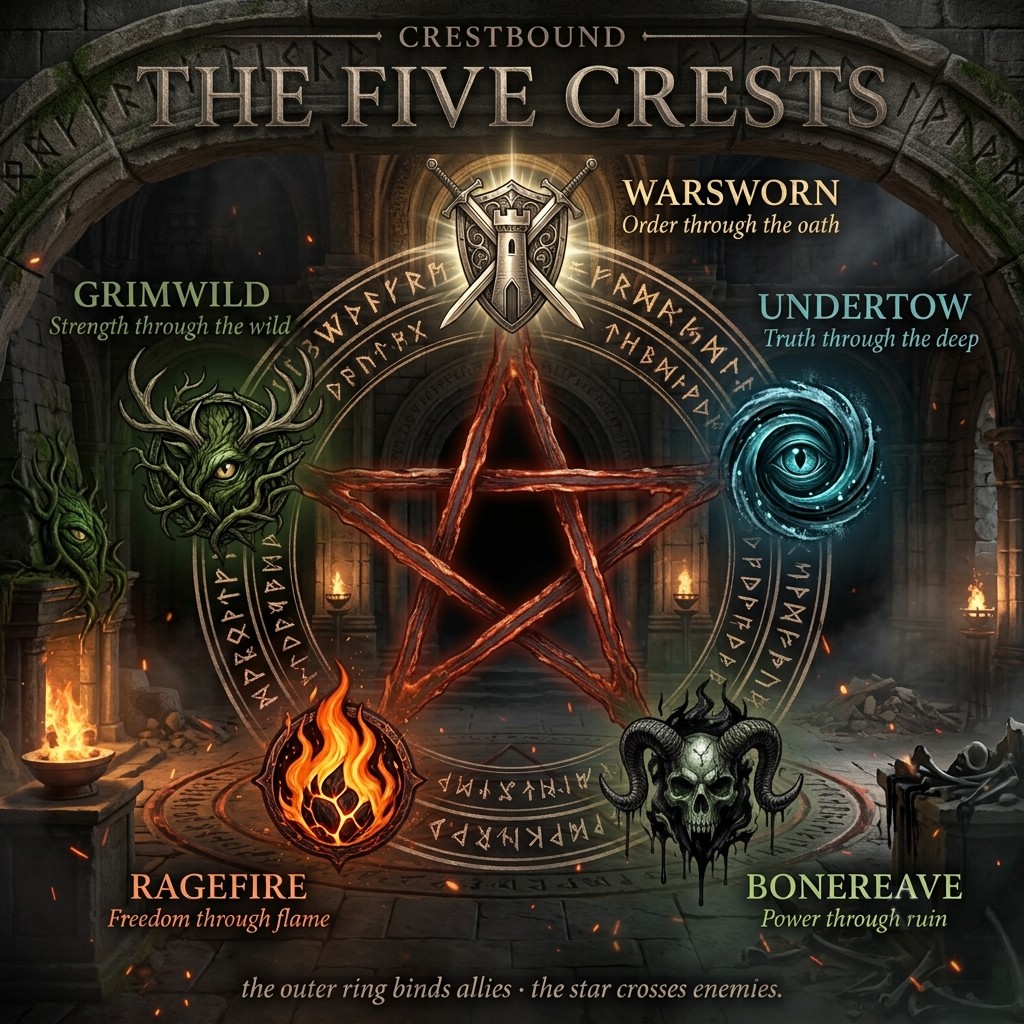
Long before Aldermarch knew quiet, its countless hearth-halls were beset by trolls, small, pink-furred, restless things that lived only to unsettle the gathered and tear down whatever others built. Against them rose the Order: armored wardens who rode hall to hall holding the peace, until the troubles swelled into the First War. No blade could win it outright, so in one last working the Order bound both the trolls’ mischief and the might of the knights who answered it into heraldic Crests, sealing each champion and troublemaker behind the sigil it had once fought under.
For generations the Crests lay quiet, their embers banked but never cold. Now they are warming again, and somewhere a hand moves among them, gathering Crest after Crest toward an end not yet written.
That hand is yours. The first Chapter, Chapter I: Embers of the First War, holds 450 Crests to track down across the four rarities. Future Chapters carry the story on.
Coming later, Wardecks & Quests. A future battle mode is on the way, where you’ll assemble a Wardeck (a 30-Crest battle group from your collection) and put it to the test. It brings a Quests screen too, the way you’ll earn Cinders for the Ember Vault (see below). That isn’t here yet; for now, Crestbound is all about building your collection.
Where to find it
Crestbound lives at crestbound.wandweb.co. Sign in with Discord and you land straight in your collection. Links to the game from the Server Assistant portal carry you there too.
The main menu
Crestbound opens into a fullscreen home with a full-art backdrop. A HUD across the top keeps your XP and Cinders balances in view, and a menu of illustrated tiles is your way around:
- Collection: your Crests, always available.
- Shop: packs, the Ember Vault and card backs, always available.
- Wardecks, Battle and Quests: the battle mode features above; their tiles show as coming soon until battle mode launches.
Use the back arrow in the top corner to move between a screen and the menu, or to exit Crestbound from the menu.
Your collection
The My Collection view shows the whole Chapter at once. Crests you own appear in full, framed by a colour marking their rarity; Crests you haven’t found yet sit as a grey ”?”, so you can see what’s still out there. A counter at the top tracks your progress and shows your spendable XP.
Rarest first. By default the grid runs mythic, then rare, uncommon, common, so your headline pieces are front and centre. The collected counter tracks how much of the Chapter you've found; the 245 XP is what you have to spend.
Sorting & filtering. A toolbar above the grid lets you Sort by Rarity (default), Cost, Name or Faction, and filter to one faction, one rarity, or just the Crests you own or are missing. Your picks stick for the session.
Looking at a Crest
Tap any Crest you own to see it up close: name, rarity, artwork, a line of ability text and a touch of flavour. Creature Crests carry an attack and health value; Spell Crests don’t fight, so they show their type instead of stats. Rare and mythic Crests catch the light with a subtle sheen.
Booster packs
You build your collection by opening booster packs. Each pack costs 200 XP and contains 5 Crests, and the last Crest in every pack is always rare or better, so there’s a guaranteed highlight in each one.
The four rarities, from most common to most prized:
| Rarity | Marker | Notes |
|---|---|---|
| Common | grey | The backbone of the Chapter. |
| Uncommon | green | A step up in scarcity. |
| Rare | blue | The guaranteed last slot of every pack. |
| Mythic | gold | The rarest and most sought-after Crests. |
Opening a pack. Head to the Shop (your collection keeps a shortcut too). Pick a pack, one of the five faction packs for 5 Crests from a single faction, or the classic Chapter Booster. Confirm the spend (you’ll need 200 XP), the pack opens with a reveal, and the five Crests are added to your collection.
Land a Crest you already have and the copy isn't wasted: duplicates stack, and you can turn spares back into XP by burning them (below).
Card backs
Every Crest you haven’t turned face-up yet, a collection placeholder, or (once battle mode lands) a face-down Crest in a deck, shows a card back. The Shop has a cosmetics shelf for dressing yours up:
| Card back | Cost |
|---|---|
| Banked Ember | Free, everyone's starting back |
| Warsworn Aegis / Undertow Sigil / Bonereave Mark / Ragefire Brand / Grimwild Knot | 300 XP each |
| Vault Gilt | 150 Cinders |
Buy a back and it equips right away. Purely cosmetic: a card back is a look, never an advantage.
The Ember Vault
The Shop’s premium pack, the Ember Vault, costs 200 Cinders and always contains 5 Crests: the first 4 guaranteed rare, the last a guaranteed mythic. It’s the surest way to land a mythic, the five faction packs never include one, and the Chapter Booster’s guaranteed rare-or-better slot only rarely turns up a mythic.
Cinders
Cinders are Crestbound’s second currency, separate from the XP that buys boosters;
they’re what the Ember Vault and the Vault Gilt card back cost. They’re earned by
completing Quests, both daily (account-bound, resetting each day) and
seasonal (global, running the length of a season), with a Quests screen tracking
progress and your live balance. Quests launch alongside battle mode (see
above), so Cinders aren’t earnable through ordinary play just yet; the Ember
Vault and Vault Gilt are visible in the Shop today, ready for when they are.
Discovering a new Crest
Most Crests already carry artwork, drawn back to light by whoever found them first. But every Crest is found by somebody first, and when that somebody is you, the discovery is yours.
Pull a Crest that no player anywhere has found before and it doesn’t arrive finished. It arrives sealed: its sigil unkindled, waiting for a hand to wake it.
Kindle it. Tap the sealed Crest and the heralds begin illuminating your sigil: its artwork is drawn back to light, just for that Crest, and kept forever. The Crest shows a countdown while they work.
You’ll get a DM when it’s ready. Server Assistant DMs you the moment your sigil is illuminated, so you don’t have to wait on the page. It keeps the surprise: the message says the Crest is ready and invites you back to unveil it, but saves the artwork for the reveal.
The grand reveal. Once your whole batch has finished illuminating, a single Unveil the Crests button appears. Tap it and your Crests are presented together, each turning over for the very first time, art and all. Nothing is shown before you unveil, and because the button only appears once every Crest’s art is finished, you never see a half-drawn card.
The art you summon is permanent, and shared. Once you’ve discovered a Crest, that artwork becomes the artwork for that Crest, for every player. Anyone who finds it after you sees the same image, with a quiet line of credit:
- First Light: a one-time achievement, awarded the first time you illuminate a Crest that no one had found before.
- Your credit: every Crest you discover carries a small “discovered DD-MM-YY by {your name}” line, shown to everyone who views it.
Found at the same time as someone else? If two players pull the same brand-new Crest close together, only the first to kindle it discovers it: they get the DM, the grand reveal and the credit. For everyone else it settles into their collection fully revealed once the heralds finish (with a note that it’s on its way), nothing to miss.
Sharing your Crests
Any revealed Crest has a subtle share option in its detail view: share the framed Crest through your device’s native share sheet, or have Server Assistant send it to your DMs.
Removing your credit
Your discovery credits are tied to your account and you control them. The game has a one-time option to remove your name from every Crest you’ve discovered. It’s permanent and can’t be undone: your credits are scrubbed, and those Crests re-open to be discovered afresh by the next player to find them. How your discovery credit and the public leaderboard work with your data is covered in the Privacy Policy.
Burning spare Crests
Got duplicates piling up? Burn a spare Crest to recover some XP. Open a Crest you own and tap Burn for N XP: the copy leaves your collection and the XP lands back in your balance. The amount depends on the rarity:
| Rarity | XP recovered |
|---|---|
| Common | 5 XP |
| Uncommon | 12 XP |
| Rare | 30 XP |
| Mythic | 75 XP |
Burning is for spares, not farming. The XP back is well below a pack's price, so it tidies up duplicates rather than shortcutting to free packs. There's a confirmation every time, and if you're about to burn your only copy the game warns you first.
See also
- XP & leveling, how you earn the XP that powers Crestbound
- Member experience, what your members see in Discord
- Back to the Wiki hub